Step 1.
Esri software is build on shape file format. Shape file format is invent by ESRI since 1970s.
ArcMap, ArcPro, desktop software pretty much all build on Shape file.
That is desktop based GIS software Shape file is format for desktop GIS.
Since 2005, google invent google map. Web based GIS launched since.
In 2008, Mapbox first invent geojson format specially for web based GIS software.
Step 2.
motorola use web based gis mapping tool.
web based gis build on geojson format.
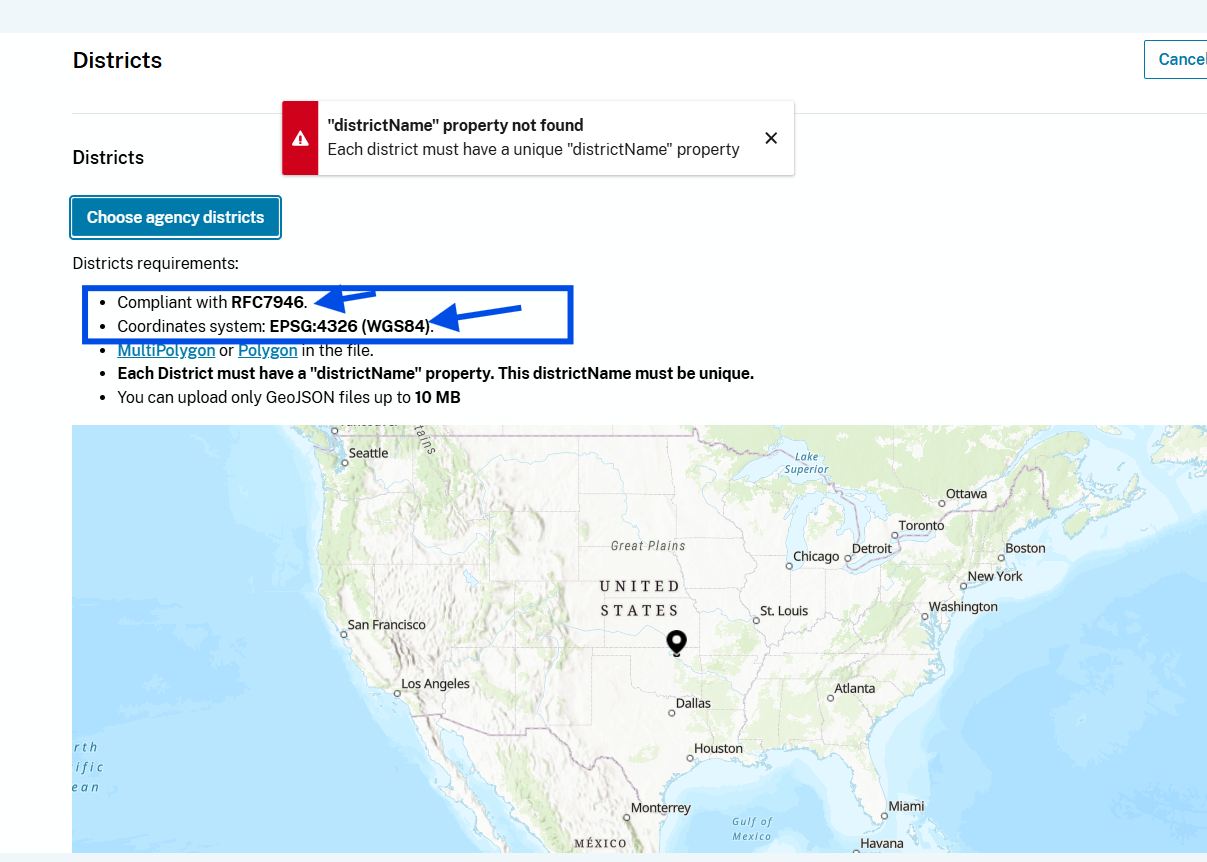
coordinate system 4326 means, it always use latitude, longitude, no matter what.
Not like shape file, have different coordinate system,
keep in mind
from ArcPro, ArcMap, you will need convert shape file with coordinate system ( state plan california zone 5 ) to geojson ( 4326 )
also, coordinate system ( state plan california zone 5 ) have unit as US-foot.
while geojson have unit is always in degree.
Step 3.
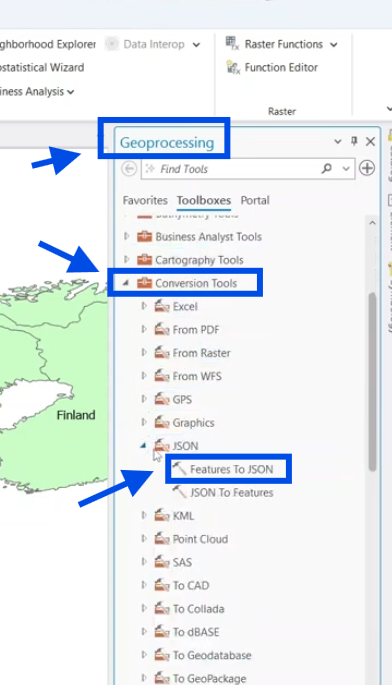
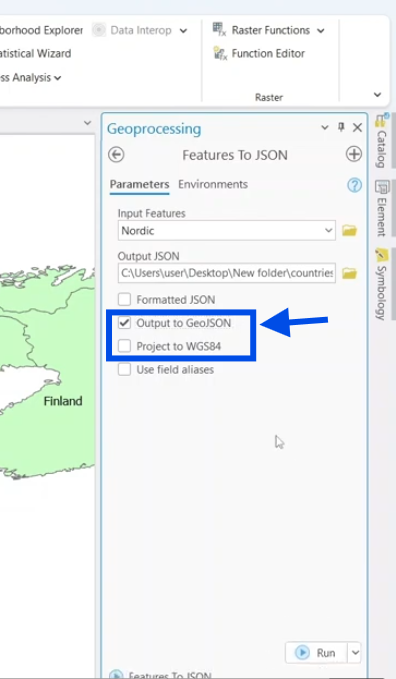
You can use ArcMap, ArcPro to convert shape file to geojson,
Step 4.
You can use ArcMap, ArcPro to convert shape file to geojson,
Step 5.
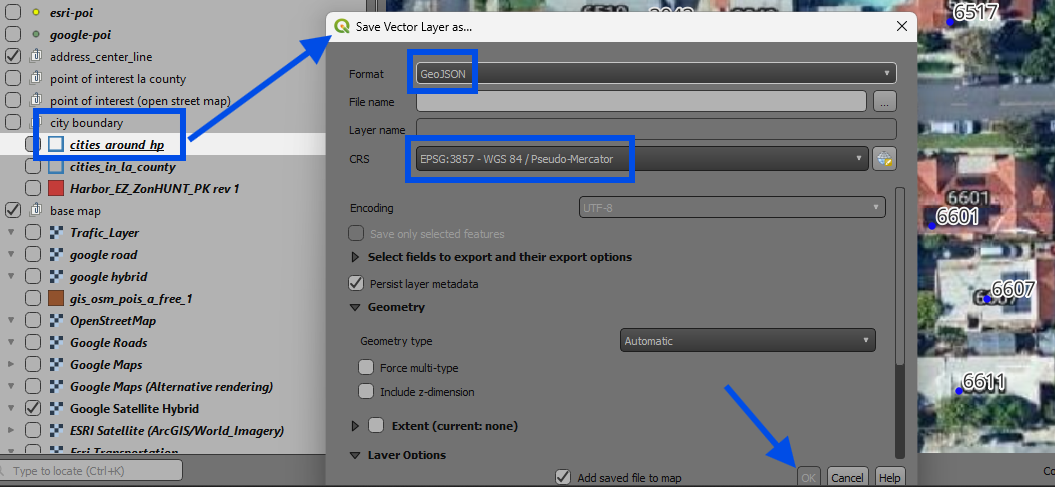
If you don't have ESRI expensive license, you still can do it with free software like this
Step 6.
What if you don't have any esri or free gis software, or you don't know how to operate ArcPro.
You still can do it without ESRI software, without any gis software.
Just download geojson directly from website, this method is good for general public user.
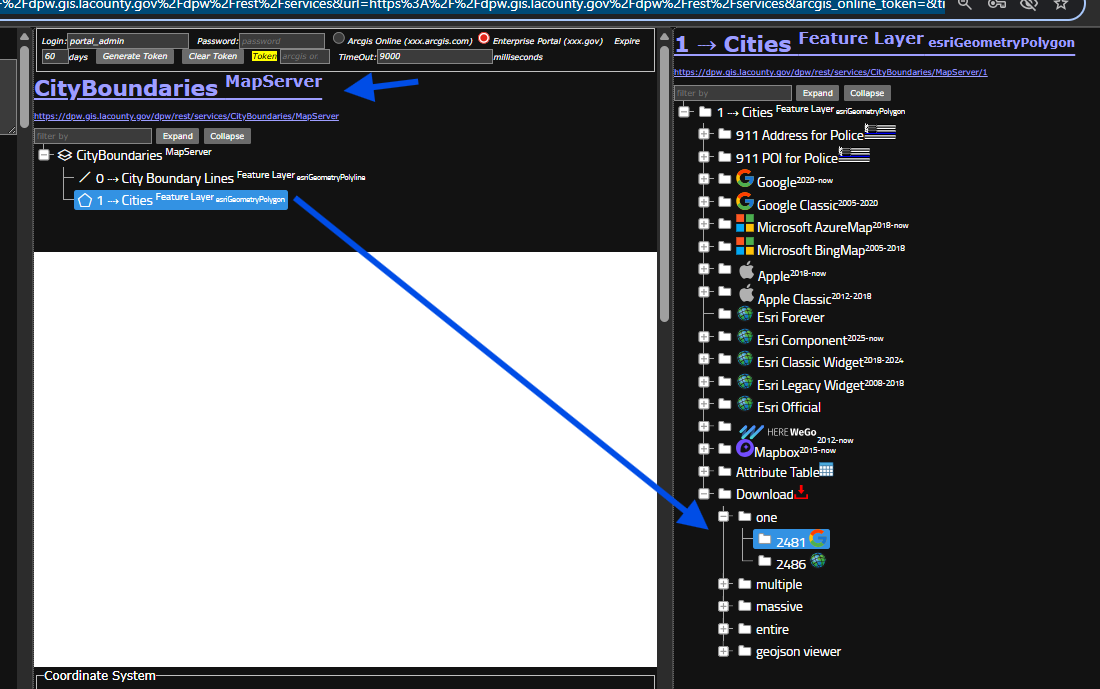
For example, you need a city boundary geojson file, for motorola web based gis tool to operate.
use model 2481
https://transparentgov.net/json2tree/esri/server/folder2.html?org=https%3A%2F%2Fdpw.gis.lacounty.gov%2Fdpw%2Frest%2Fservices&url=https%3A%2F%2Fdpw.gis.lacounty.gov%2Fdpw%2Frest%2Fservices&arcgis_online_token=&timeout=9000&select_folder=25&select_layer=1&select_folder_text=CityBoundaries+%3Csup%3EMapServer%3C%2Fsup%3E&select_layer_text=1+%26%23x21E2%3B+Cities+%3Csup%3EFeature+Layer%3Csub%3E+esriGeometryPolygon%3C%2Fsub%3E%3C%2Fsup%3E
Step 7.
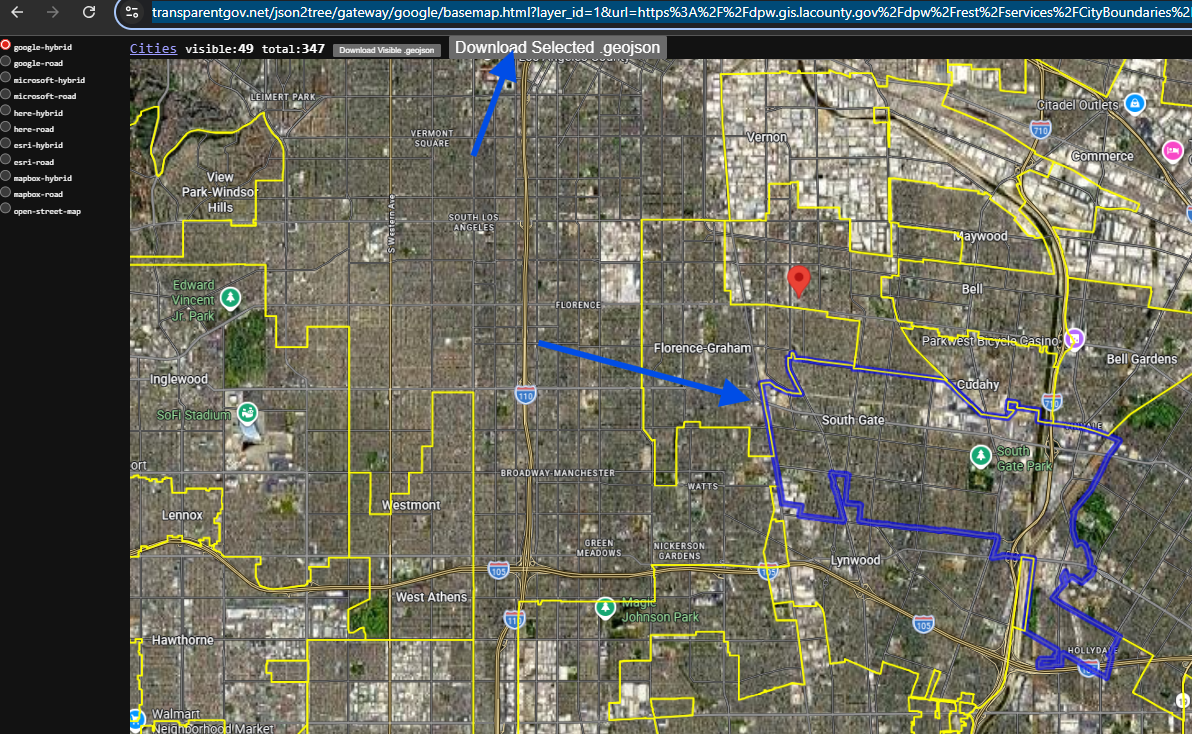
click map to select ONE city.
then click dodwnload .geojson button
Done.
https://transparentgov.net/json2tree/gateway/google/basemap.html?layer_id=1&url=https%3A%2F%2Fdpw.gis.lacounty.gov%2Fdpw%2Frest%2Fservices%2FCityBoundaries%2FMapServer&layer=Cities&panto=0¢er_lat=33.943470196571035¢er_long=-118.2236999980209¢er_zoom=12
Step 8.
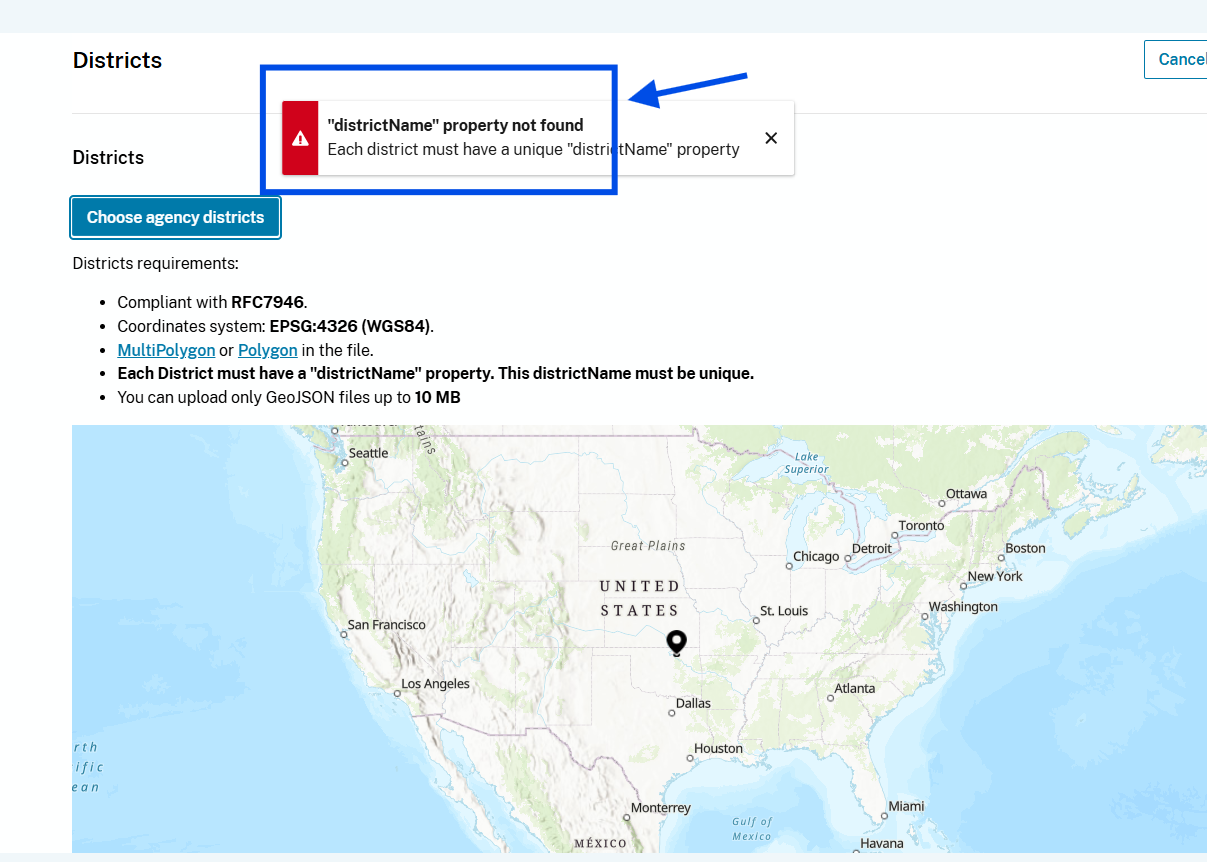
how to fix this error,
Step 9.
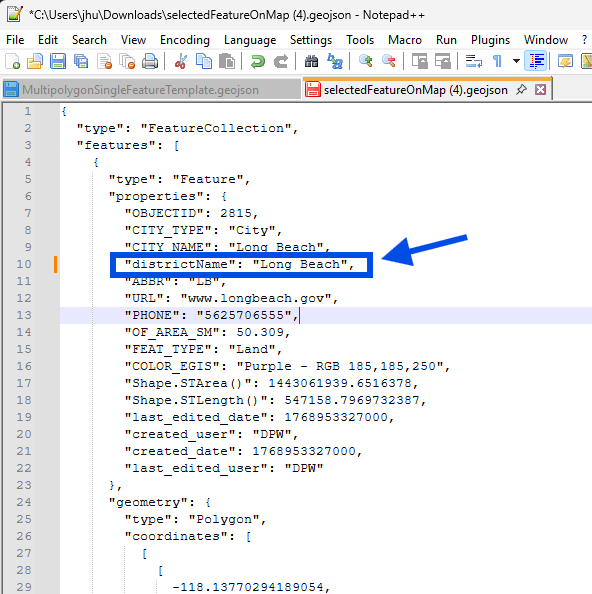
you just downloaded geojson file is actually text file, it is not like shape file,
Shape file is binary file, not human readable, you can not open it in text pad, can not directly edit it with note pad. To edit shape file, you will need desktop gis software, arcMap, arcpro,
Geojson is text file, you don't need gis software,
any text editor will do the job.
geojson is human readable text, you can just edit it
To fix this error, you need add the missing property value
Step 10.
upload the geojson file you downloaded
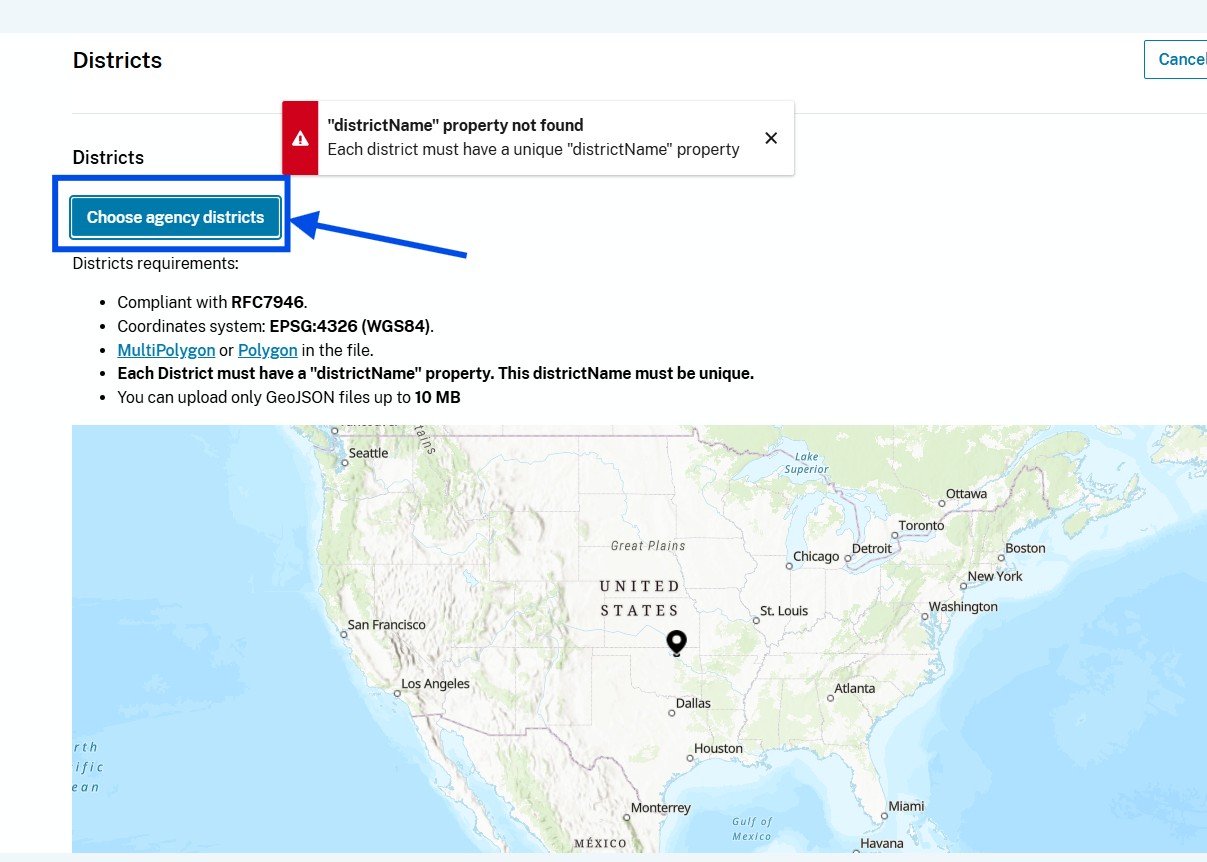
Step 11.
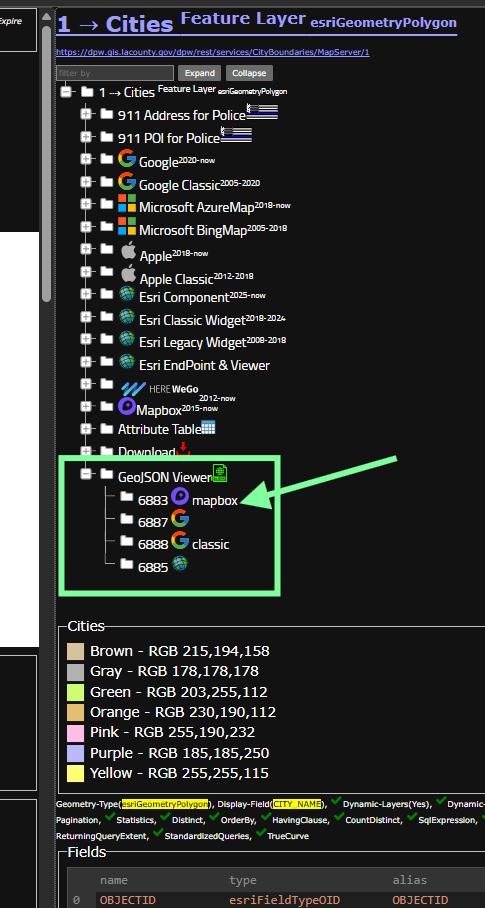
upload your geojson file to any of these viewer to verify you download correctly.
try mapbox, mapbox invent geojson
https://transparentgov.net/json2tree/esri/server/folder2.html?org=https%3A%2F%2Fdpw.gis.lacounty.gov%2Fdpw%2Frest%2Fservices&url=https%3A%2F%2Fdpw.gis.lacounty.gov%2Fdpw%2Frest%2Fservices&arcgis_online_token=&timeout=9000&select_folder=25&select_layer=1&select_folder_text=CityBoundaries+%3Csup%3EMapServer%3C%2Fsup%3E&select_layer_text=1+%26%23x21E2%3B+Cities+%3Csup%3EFeature+Layer%3Csub%3E+esriGeometryPolygon%3C%2Fsub%3E%3C%2Fsup%3E
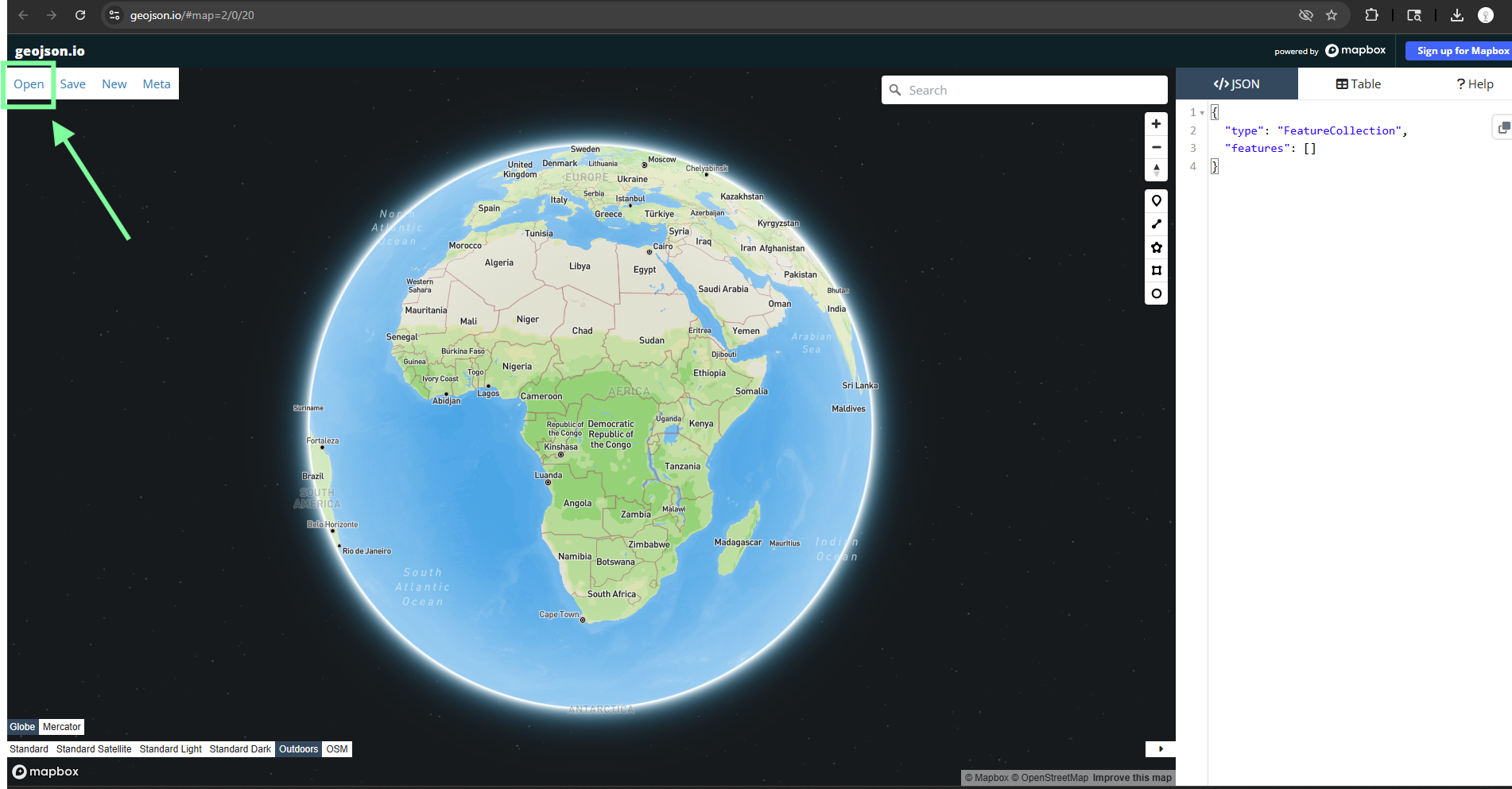
Step 12.
click open button, then select your geojson file
https://geojson.io/#map=2/0/20
Step 13.
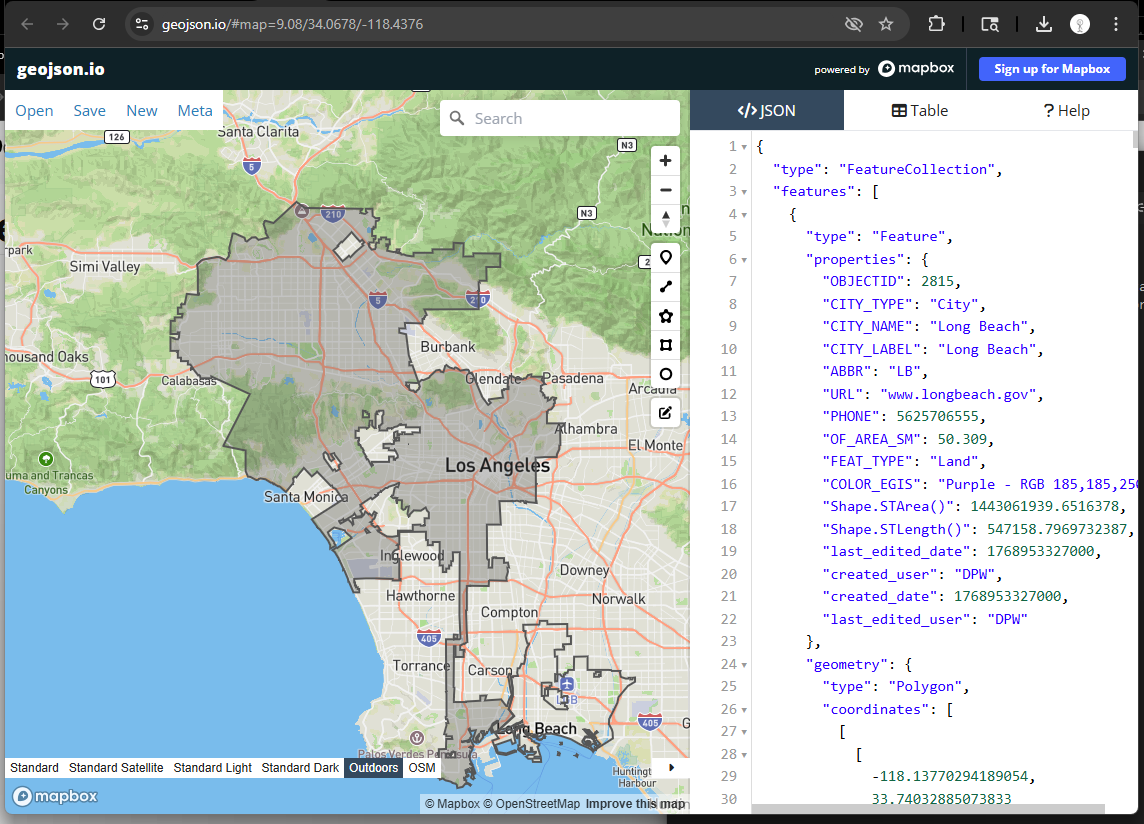
you can edit your geojson here and download from here again.
some of motorola cad component is web based gis, which is build on geojson format,
this tool is easy to edit your geojson file.
Step 14.
root
https://transparentgov.net/json2tree/esri/server/root.html?org=https%3A%2F%2Fdpw.gis.lacounty.gov%2Fdpw%2Frest%2Fservices&url=https%3A%2F%2Fdpw.gis.lacounty.gov%2Fdpw%2Frest%2Fservices&arcgis_online_token=&timeout=9000&select_folder=25&select_layer=&select_folder_text=CityBoundaries+%3Csup%3EMapServer%3C%2Fsup%3E&select_layer_text=1+%26%23x21E2%3B+Cities+%3Csup%3EFeature+Layer%3Csub%3E+esriGeometryPolygon%3C%2Fsub%3E%3C%2Fsup%3E
Step 15.
folder_mobile
https://transparentgov.net/json2tree/esri/server/folder_mobile.html?org=https%3A%2F%2Fdpw.gis.lacounty.gov%2Fdpw%2Frest%2Fservices&url=https%3A%2F%2Fdpw.gis.lacounty.gov%2Fdpw%2Frest%2Fservices&arcgis_online_token=&timeout=9000&select_folder=25&select_layer=1&select_folder_text=CityBoundaries+%3Csup%3EMapServer%3C%2Fsup%3E&select_layer_text=1+%26%23x21E2%3B+Cities+%3Csup%3EFeature+Layer%3Csub%3E+esriGeometryPolygon%3C%2Fsub%3E%3C%2Fsup%3E
Step 16.
layers
https://transparentgov.net/json2tree/esri/server2/layers.html?org=https%3A%2F%2Fdpw.gis.lacounty.gov%2Fdpw%2Frest%2Fservices&url=https%3A%2F%2Fdpw.gis.lacounty.gov%2Fdpw%2Frest%2Fservices
Step 17.
servers
https://transparentgov.net/json2tree/esri/server2/servers.html?org=https%3A%2F%2Fdpw.gis.lacounty.gov%2Fdpw%2Frest%2Fservices&url=https%3A%2F%2Fdpw.gis.lacounty.gov%2Fdpw%2Frest%2Fservices
Step 18.
layers2
https://transparentgov.net/json2tree/esri/server2/layers2.html?org=https%3A%2F%2Fdpw.gis.lacounty.gov%2Fdpw%2Frest%2Fservices&url=https%3A%2F%2Fdpw.gis.lacounty.gov%2Fdpw%2Frest%2Fservices
Step 19.
servers2
https://transparentgov.net/json2tree/esri/server2/servers2.html?org=https%3A%2F%2Fdpw.gis.lacounty.gov%2Fdpw%2Frest%2Fservices&url=https%3A%2F%2Fdpw.gis.lacounty.gov%2Fdpw%2Frest%2Fservices
Step 20.